


ZINIO - Magazine Newsstand
4.35.04K Reviews
App Specs
- Version
- 4.76.1
- Updated On
- License
- Free
- Downloads
- 50,000,000+
- Developer
- ZINIO
- Categories
- News & Magazines
- Platform
- Android, iOS
Screenshots


 Analysis by AppCompare
So, I recently got my hands on ZINIO - Magazine Newsstand, and let me tell you, it’s like having a library in your pocket. This app is a must-try for anyone who loves diving into a good magazine, whether it’s for leisure reading or keeping up with the latest trends. Let’s jump into what makes this app tick.
For me, the main appeal is having a place to browse magazine titles and read issues without carrying a stack of print copies around. It works best when I already know the kinds of subjects I enjoy but want to discover publications beyond the ones I usually see at a shop. It can also suit readers who dip into several subjects rather than following one newspaper or a single news feed.
A practical way to try it is to treat the first visit as a browsing session, not a shopping decision. Search for a title or explore a category, then look at whether the magazines you actually want are available and whether their reading style suits you. That small check matters: a digital newsstand is only useful if its selection matches your interests, and a broad range does not automatically mean every reader will find the right fit.
What’s the Buzz About?
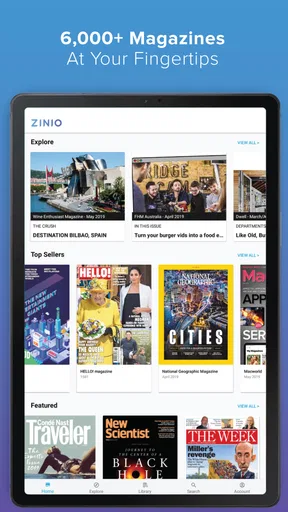
First things first, ZINIO - Magazine Newsstand is your digital gateway to thousands of magazines from around the world. We’re talking about everything from fashion to tech, and even niche hobbies like quilting or bird watching. The app offers a sleek and easy-to-navigate interface, making it a breeze to find and read your favorite magazines.
That range makes the app feel different from a typical news app. News apps tend to be built around short, frequently refreshed stories, while magazines usually give a subject more space and a more deliberate visual treatment. I would choose this for a weekend feature, a specialist hobby, or a longer interview; for breaking headlines, a dedicated news source is the more natural fit. The trade-off is that browsing a large magazine catalog can take longer than opening a familiar feed.
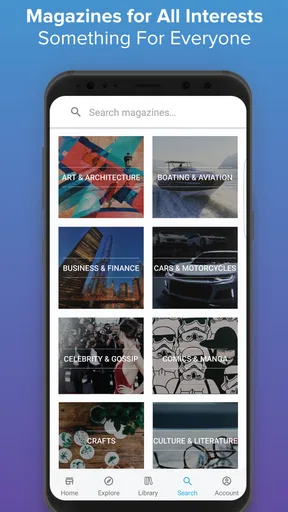
One thing I noticed right off the bat is how organized everything is. You can easily search for magazines by category or title, and there’s a handy section that recommends new reads based on your interests. It’s like having a personal librarian who knows exactly what you’ll love.
I’d use search when I have a clear target and categories when I’m in the mood to explore. Recommendations are useful as a starting point, but I wouldn’t treat them as a complete picture of what the catalog offers. If a suggestion misses, searching by subject or title gives me a more direct route. This is especially handy when I’m looking for a publication I already know, rather than hoping a general discovery feed surfaces it.
Worth Reading Before You Choose

Baby Panda World Brings Quick Play to Modern Phones, but Its Game Library Feels Busy

ESPN’s Live Game View Makes Following Close Games Easier

QuizzLand Review: A Good Fit for Short Trivia Breaks, Not Every Player

Basketball Stars: Multiplayer Is Fast, but Can It Recover When Matches Go Wrong?

WEBTOON Turns Phone Updates Into a Better Reading Routine

Link to Windows Runs on Shared Habits, Not Social Feeds
Features to Fall For
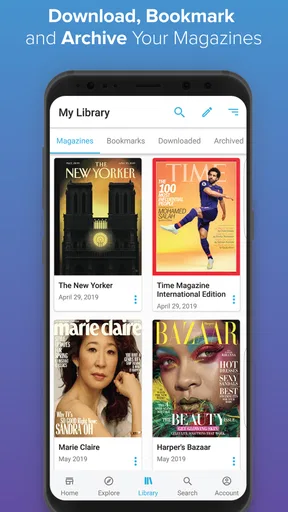
Now, let’s get into the nitty-gritty of what you can expect once you’ve installed the app. One of the standout features is the ability to download magazines for offline reading. This is perfect for those long commutes or when you’re stuck somewhere without Wi-Fi. You can stock up on your favorite issues and read them anytime, anywhere.
My useful habit here is to download an issue while I’m on a reliable connection, then open it once before leaving. That gives me a chance to make sure it is ready for the trip instead of discovering a problem when I’m already offline. I’d also be selective about what I keep downloaded: illustrated magazine issues can take up more room than a quick text article, so clearing finished issues is a sensible part of keeping a reading library manageable.
Another cool feature is the interactive content. Some magazines offer enhanced content like videos and clickable links, which makes reading a lot more engaging. It’s like the print version, but with a digital twist.
The word “some” is important. I’d approach each issue as its own experience rather than expecting every page to behave like a web article. When interactive elements are present, they can add context or make a feature more lively; when they are not, the magazine remains something to read page by page. If I’m offline, I would not count on every connected extra behaving the same way as the downloaded pages, so I’d enjoy those elements when I have a connection.
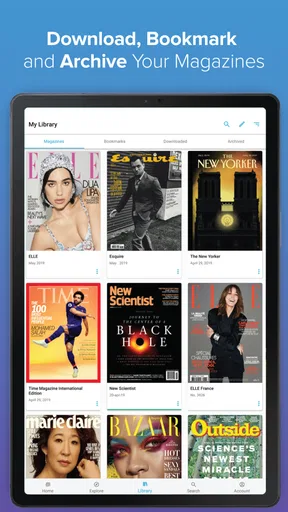
And for those who like to keep things neat and tidy, the library management system is top-notch. You can organize your magazines into custom collections and even archive old issues. It’s a lifesaver for those of us who can’t stand clutter.
Collections can do more than make a library look tidy: they can create a useful reading queue. I might group issues by a current project or by the subjects I want to return to, rather than leaving everything in one long list. Archiving is helpful when I want to clear the active view without treating an issue as something I no longer care about. That distinction is worth using if I tend to revisit reference articles or visual inspiration.
My Personal Take
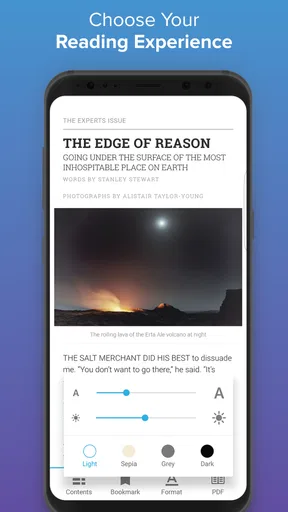
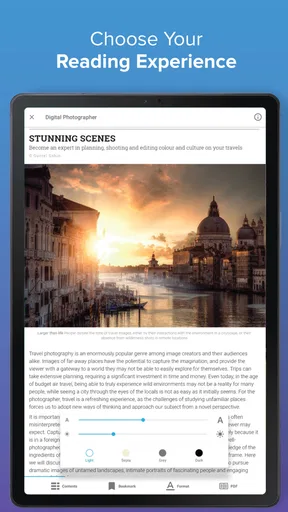
In my experience, the reading experience on ZINIO is as close to flipping through a physical magazine as you can get digitally. The high-resolution images and smooth page transitions make it feel authentic. Plus, you can adjust text size and brightness, which is great for late-night reading sessions.
There is a real choice between preserving the page design and reading comfortably on a small screen. Magazine layouts can rely on carefully placed images, captions, and columns, so the page view often makes the editor’s intended design easier to appreciate. If I’m reading a long piece in a dim room, I’d try the text and brightness controls rather than assume one viewing mode will suit every issue. For photography or design features, I may prefer to linger on the original layout; for a lengthy article, comfort matters more.
That makes the app a particularly good match for readers who value art direction, photography, and specialist editorial coverage. It is less compelling for someone who mainly wants quick summaries or a constant stream of breaking updates. I also would not replace a print magazine with a digital one automatically: anyone who collects physical issues, enjoys the feel of paper, or wants a copy to share around may prefer print for those occasions.
One thing I’d love to see in future updates is more personalized recommendations. While the current system is pretty good, it’d be awesome if it could dig even deeper into my reading habits to suggest those hidden gems I might not find on my own.
That is the point I would keep in mind while exploring: recommendations can help me find a next read, but I still get the best results by combining them with deliberate searches and category browsing. I would not build my whole reading routine around the assumption that the app will predict every interest. A little browsing is part of the pleasure, though it may feel like extra work if I only want one specific article quickly.
How It Fits into an Everyday Reading Routine
Imagine I have a train ride coming up and want something more absorbing than a series of short updates. I can search for a magazine tied to an interest, choose an issue that looks worth reading, and download it before leaving. During the ride, I can read without depending on a connection, save my place in my own routine, and return to the issue later. If I find a useful feature, I can keep the issue organized in a collection instead of letting it disappear among other reading.
For a different routine, I might use it at home on a tablet or phone when I want to browse rather than commit to a single title. That is where categories and recommendations are most useful: they help turn a few spare minutes into discovery. I would still set a limit on browsing if I had a particular article in mind, since exploring a broad catalog can easily become its own activity.
People who read across several hobbies, enjoy magazine photography, or want issues available away from a desk are likely to get the most from it. People who mainly want free, fast-moving headline coverage should compare it with conventional news apps instead. And if a person only reads one publication, it is worth checking whether that publication’s own app offers a simpler routine before building a broader digital library.
Costs, Compatibility, and the Version You’ll Find
The app itself is free to install, but that does not mean every magazine or issue is free to read. In-app purchases range from about fifty cents to around four hundred dollars per item, so I would check the price of the particular title or issue before making a purchase. That wide range makes it especially important to distinguish between trying the app and paying for the reading material inside it.
ZINIO is developed by ZINIO, has a Teen content rating, and its current version is 4.72.1. It has been available since May 30, 2011, which gives it a long history as a digital magazine reader, while the current version number is the clearest sign of the software state a new user is considering. The app has a 4.4 average from around 58,000 ratings and more than 50 million installs. Those figures suggest a well-established audience, but they cannot tell me whether a specific magazine is available or whether its price suits my budget.
For existing readers, the practical question is less about a version number and more about whether the library and reading habits they have built still work for them. Before changing devices or reorganizing a collection, I would check that my issues appear in the library and that the titles I rely on remain easy to find. Keeping important issues organized and downloading planned reading in advance are simple habits that reduce friction regardless of how often the app changes.
When deciding whether it fits a device, I would also check the operating-system requirement before installing. The minimum supported system is Android 5.0, so older devices may be a concern if they run an earlier version. On a compatible phone, I would start by testing the reading experience with an issue I genuinely want, rather than assuming that a polished catalog view guarantees every page will be comfortable on my screen.
What I’d Keep an Eye On
The clearest things I would watch are the magazine selection that matters to me, how useful the recommendations become, and whether the reading tools continue to suit the way I use each issue. Those are more meaningful checks than expecting an update to transform the basic idea of the app. A new version can matter to regular readers, but the everyday value still comes from finding the right publication and having a pleasant way to read it.
I would also pay attention to my own habits after a week or two. If I repeatedly download issues for commutes, return to saved reading, and discover titles through search, the app is earning its place. If I mostly open it for a quick headline and leave, a news-focused alternative may fit better. That is a useful way to judge a digital magazine service without mistaking a large catalog for a personal match.
Wrapping It Up
Overall, ZINIO - Magazine Newsstand is a fantastic app for magazine lovers. It’s versatile, user-friendly, and packed with content that caters to all tastes. Whether you’re a casual reader or a magazine aficionado, this app has something for you.
If you’re ready to transform your reading experience, give ZINIO a try. You might just find your next favorite magazine, or two, or three… Happy reading!
Pros
- Wide selection of magazines available.
- User-friendly interface for easy navigation.
- Offline reading mode available.
- High-quality digital magazine formats.
- Customizable reading preferences.
Cons
- Limited free content options.
- Occasional app crashes reported.
- Some magazines have high prices.
- Requires large storage space.
- No text-to-speech feature.
FAQs for ZINIO - Magazine Newsstand
What is ZINIO and how does it work?
ZINIO is a digital newsstand app that provides access to thousands of magazines from around the world. Users can browse, purchase, and read magazines on their devices. The app offers a seamless reading experience with features like offline reading, bookmarking, and interactive content. It's available for both Android and iOS platforms.
Is ZINIO free to use?
ZINIO itself is free to download, but users need to purchase individual magazines or subscribe to them. There are some free magazines and articles available, but most premium content requires a purchase. The app occasionally offers discounts and deals, so it's worth checking regularly for promotions.
Can I read magazines offline with ZINIO?
Yes, ZINIO allows users to download magazines to their devices for offline reading. This is particularly useful for those who want to read on the go without needing an internet connection. Simply download the magazine while online, and it will be accessible offline in your library.
What devices are compatible with ZINIO?
ZINIO is compatible with a wide range of devices, including smartphones, tablets, and computers. It supports both Android and iOS platforms, and there's also a web version for desktop users. This makes it easy to access your magazines across different devices seamlessly.
How can I manage my subscriptions on ZINIO?
Managing subscriptions on ZINIO is straightforward. Users can handle their subscriptions directly within the app by navigating to the account settings. Here, you can view your current subscriptions, renew them, or cancel if needed. Additionally, ZINIO sends notifications about subscription renewals and new issues.


